Evaluating Botanical Procreate Stamps for Digital Illustration
Digital illustration has evolved significantly with the advent of powerful tablet applications, yet the challenge of replicating organic textures remains a primary hurdle for many artists. Botanical Procreate Stamps represent a specialized category of digital assets designed to bridge the gap between hand-drawn precision and digital efficiency. These tools are not merely pre-made images but functional brush stamps that integrate directly into the workflow of the Procreate application on iPad. For artists, designers, and hobbyists evaluating whether to incorporate these assets into their library, understanding the specific utility, limitations, and technical requirements is essential for making an informed decision.
Understanding the Asset Type
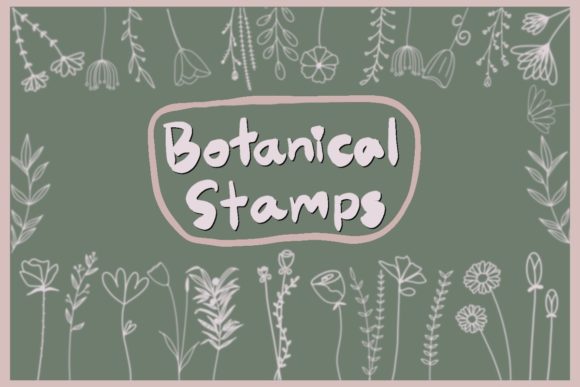
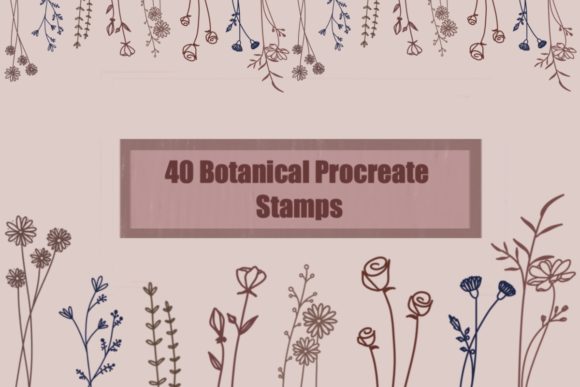
At their core, botanical brush stamps for Procreate are digital files formatted specifically to function as custom brushes within the software. Unlike standard image files that must be copied, pasted, and transformed manually, these stamps operate as dynamic tools. When a user selects the brush and taps or swipes on the canvas, the botanical element—such as a leaf, flower petal, fern, or branch—is rendered instantly. The product described here typically consists of a single zip file containing a .brushset file with approximately 40 distinct botanical designs. Upon installation, these appear in the user's brush library, ready for immediate deployment.
The defining characteristic of high-quality botanical stamps is their versatility regarding color and opacity. Because they function as brushes rather than static flattened images, users can alter the hue, saturation, and brightness of the stamp in real-time using the color picker. Furthermore, the opacity can be adjusted via pressure sensitivity or slider controls, allowing for layering effects that mimic traditional watercolor or ink techniques. This flexibility is crucial for artists who need to maintain a cohesive color palette across a complex composition without being restricted by the original colors of the stamp source.
Strategic Benefits for Digital Artists
The primary reason an artist might seek out Botanical Procreate Stamps is the significant reduction in time spent on repetitive detailing. Rendering realistic foliage from scratch requires a deep understanding of anatomy, light, and texture, which can be time-consuming. By utilizing pre-made stamps, an illustrator can establish the foundational elements of a botanical scene rapidly, freeing up mental energy to focus on composition, lighting, and narrative elements. This is particularly beneficial for commercial illustrators working under tight deadlines or pattern designers who need to populate large surfaces with consistent organic motifs.
Another substantial benefit is the consistency of scale and style. When creating a series of illustrations or a repeating pattern, maintaining uniformity in the botanical elements can be difficult when drawing freehand. A dedicated brush set ensures that every leaf or flower shares the same line weight, texture, and artistic style. Additionally, because these files are delivered without watermarks or drop shadows, they offer a clean base that integrates seamlessly into professional work. The absence of shadows is particularly important, as it allows the artist to paint their own lighting and depth, ensuring the stamped elements obey the same light source as the rest of the illustration.
Technical Considerations and Installation
Potential users must be aware that this is a strictly digital product; no physical items will be shipped. The acquisition process involves downloading a digital file, which necessitates specific hardware and software conditions. The most critical requirement is an iPad with the Procreate application installed. It is imperative that the user ensures they have the latest version of Procreate, as older versions may not support newer brush file formats or features, leading to compatibility errors.
The installation process requires direct interaction with the iPad's file management system. Users are advised to download the zip file directly onto their iPad rather than a desktop computer, as transferring files between operating systems can sometimes complicate the import process for mobile-specific formats. Once downloaded, tapping the file should trigger an automatic import into Procreate. If this does not occur, the "Import" function within the Procreate brush studio serves as a reliable alternative. Understanding this workflow is vital for users who may be less familiar with iOS file management, as frustration often arises from attempting to open these files on incompatible devices like Windows PCs or Android tablets.
Evaluating Fit: When to Choose Stamps vs. Freehand
Deciding whether Botanical Procreate Stamps align with your goals depends largely on your artistic intent and the nature of your project. These tools are a strong fit for scenario-based illustration, such as creating wedding invitations, packaging design, surface pattern design, and social media content where speed and aesthetic consistency are prioritized. They are also excellent for beginners who wish to create beautiful botanical compositions while they are still developing their fundamental drawing skills. In these contexts, the stamps act as a scaffold, allowing the user to produce professional-looking results while learning.
However, there are situations where alternatives may be worth considering. If an artist's goal is to develop a highly unique, signature style that relies on imperfect, idiosyncratic line work, relying heavily on pre-made stamps might hinder that development. Stamps, by definition, are reusable assets; if overused without modification, they can lead to a portfolio that looks generic or recognizable as "stock" art. Artists aiming for fine art status or those who prioritize the meditative process of drawing every stroke may find that freehand sketching, perhaps aided by reference photos rather than stamps, better serves their long-term growth. Additionally, if a project requires specific botanical accuracy that the 40 included stamps do not cover (e.g., a rare species of orchid not present in the set), the artist would still need to draw those elements manually or source additional specific brushes.
Making the Decision
When evaluating a purchase of botanical brush stamps, consider the trade-off between convenience and customization. The value proposition lies in the ability to resize and recolor the elements infinitely without loss of quality, a feature inherent to the vector-like behavior of some brushes or the high-resolution raster nature of others. Before committing, review the preview images to ensure the style of the strokes matches your existing artwork. A hyper-realistic stamp set may clash with a whimsical, cartoonish illustration style, requiring significant editing to blend.
Ultimately, Botanical Procreate Stamps are a practical investment for those looking to streamline their digital workflow without sacrificing the organic feel of natural elements. They offer a balanced solution for creators who need efficiency but still desire the control to manipulate color, size, and placement. By ensuring you have the correct device setup and clear expectations regarding the digital nature of the product, these tools can become a versatile component of your creative toolkit, enhancing productivity while maintaining artistic integrity.