Mastering Digital Calligraphy with the Somer Procreate Lettering Brush
The transition from traditional ink and paper to digital illustration has revolutionized the way artists, designers, and hobbyists approach typography. For many, the tactile resistance of a nib against textured paper is irreplaceable, yet the flexibility, undo capabilities, and layer management of digital tools offer unparalleled creative freedom. At the heart of this digital transformation is the quality of the tool itself. The Somer Procreate Lettering Brush stands out as a specialized instrument designed to bridge the gap between analog elegance and digital efficiency. It is not merely a preset; it is a carefully calibrated tool that responds to the nuances of hand movement, allowing users to create sophisticated lettering without the steep learning curve often associated with vector-based design software.
The Art of Modern Calligraphy in a Digital Space
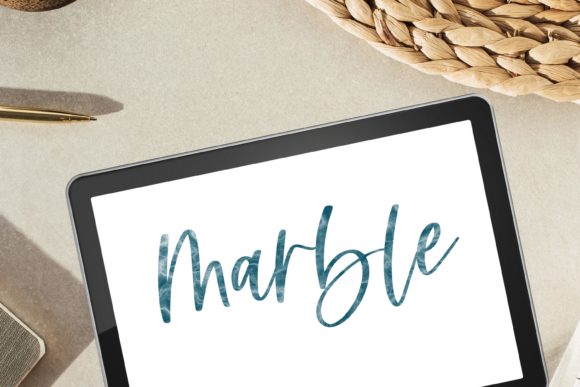
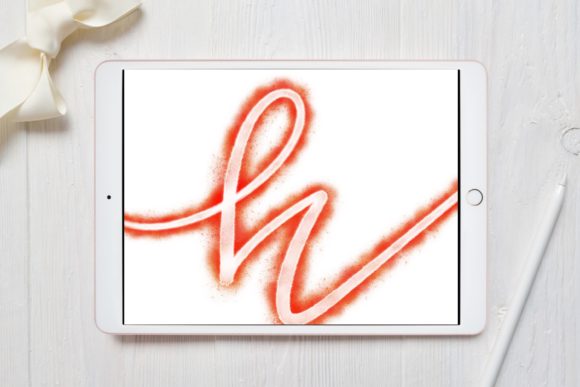
Modern calligraphy differs significantly from traditional copperplate or Spencerian scripts. It is characterized by its relaxed rules, varied baseline structures, and expressive flourishes. To capture this organic feel digitally, one needs a brush that mimics the behavior of a flexible nib or a soft brush pen. The Somer brush for Procreate 5 and above is engineered specifically for this purpose. Unlike standard round brushes that maintain a uniform width regardless of speed or angle, this lettering brush utilizes pressure sensitivity to vary stroke thickness dynamically. This means that a light touch produces delicate hairlines, while increased pressure results in bold, sweeping downstrokes.
This dynamic range is crucial for achieving the contrast that defines elegant lettering. When you are crafting a quote design or a wedding invitation, the interplay between thick and thin lines creates visual rhythm. The Somer brush allows for this modulation to happen naturally, reducing the need for post-production editing. For professionals who deliver high volumes of custom typography, this efficiency translates directly into saved time and higher productivity. For hobbyists, it lowers the barrier to entry, allowing them to produce professional-looking results early in their learning journey.
Versatility Across Creative Projects
While the primary function of this tool is lettering, its utility extends far beyond simple text creation. The versatility of the Somer Procreate Lettering Brush makes it an essential asset for a wide array of graphic design projects. Consider the following applications where this brush excels:
- Wedding Stationery: Creating bespoke invitations requires a personal touch. The brush’s ability to mimic hand-drawn imperfections adds warmth and authenticity to digital designs, making them feel intimate and special.
- Logo Design: Many modern brands seek a handwritten aesthetic to appear approachable and artisanal. This brush allows designers to sketch unique logotypes that stand out from generic font libraries.
- Greeting Cards: Whether for birthdays, holidays, or thank-you notes, the brush enables the creation of heartfelt messages that look like they were penned by hand.
- Social Media Graphics: In the age of Instagram and Pinterest, eye-catching quote images drive engagement. The elegant strokes produced by this brush help content creators design shareable assets that capture attention.
- Packaging and Labeling: Small businesses often use hand-lettered labels for products like candles, jams, or cosmetics. This tool facilitates the design of labels that convey craftsmanship and quality.
Each of these use cases benefits from the brush’s consistent performance. Because it is hand-drawn and designed with specific texture parameters, it avoids the sterile, computer-generated look that can sometimes plague digital typography. Instead, it retains the human element, which is increasingly valued in contemporary design trends.
Technical Requirements and Compatibility
To fully leverage the capabilities of the Somer brush for Procreate 5 and above, understanding the hardware and software ecosystem is essential. Digital lettering is heavily dependent on pressure sensitivity, a feature that not all styluses or devices support equally. Therefore, the requirements for using this brush are specific:
- iPad Pro: While the brush may function on other iPad models, the iPad Pro offers the optimal display technology and processing power for smooth, lag-free drawing experiences. The high refresh rate of the ProMotion display ensures that strokes appear instantly, mimicking the immediacy of real ink.
- Apple Pencil: This is non-negotiable for serious lettering work. The Apple Pencil provides the precise pressure and tilt sensitivity required to activate the brush’s dynamic features. Without a compatible pressure-sensitive stylus, the brush cannot vary line weight, rendering it ineffective for calligraphy.
- Procreate App: The brush is built exclusively for the Procreate environment. It leverages Procreate’s proprietary brush engine, which handles stabilization, streamline, and texture mapping in ways that other apps do not.
It is critical to note that this brush is not suitable for Photoshop or any other computer-based software. Attempting to use it outside of the Procreate ecosystem on an iPad will result in incompatibility. Furthermore, it is not designed for use with mouse inputs or non-pressure-sensitive styluses. Users must ensure their setup meets these criteria to avoid frustration and to achieve the intended artistic results. This specificity ensures that the brush performs consistently, providing a reliable tool for daily creative work.
Enhancing Your Workspace and Creative Flow
Beyond its functional attributes, the Somer Procreate Lettering Brush contributes to the overall aesthetic and psychological experience of creating. A well-organized digital workspace can significantly impact productivity and inspiration. By incorporating a high-quality, specialized brush into your library, you jazz up your workspace and home studio environment. The confidence that comes from using a tool that responds predictably allows artists to focus on composition and creativity rather than fighting with technical limitations.
For educators and researchers studying digital art pedagogy, this brush serves as an excellent example of how tool design influences learning outcomes. Students who struggle with the mechanics of traditional calligraphy often find success with digital alternatives that offer forgiveness and flexibility. The ability to undo mistakes, adjust opacity, and experiment with colors without wasting physical materials encourages experimentation and risk-taking. This fosters a deeper understanding of typographic principles, such as spacing, balance, and hierarchy.
Moreover, the integration of such tools into home offices and creative studios reflects a broader trend towards personalized digital environments. As remote work and freelance creativity become more prevalent, the home workspace becomes a sanctuary for innovation. Tools that are both beautiful and functional, like the Somer brush, enhance this space, making it a place where professional-grade work can be produced comfortably.
Best Practices for Optimal Results
To get the most out of the Somer brush for Procreate 5 and above, users should adopt certain best practices. First, always enable the "Streamline" feature in Procreate when working on long, sweeping curves. This stabilizes the stroke, smoothing out hand jitters and resulting in cleaner lines. Second, experiment with the opacity settings. Lowering the opacity can create layered, textured effects that add depth to your lettering. Third, utilize layers effectively. Keep your sketch on a separate layer from your final inked lines. This allows you to refine your shapes without altering the underlying structure.
Additionally, consider the canvas resolution. For print-ready designs like wedding stationary or logos, ensure your canvas is set to at least 300 DPI. This ensures that the crisp edges produced by the brush remain sharp when printed. For web-based graphics, such as social media posts, a lower resolution may suffice, but maintaining high quality ensures versatility across different platforms.
Finally, practice consistency. Digital calligraphy, like its traditional counterpart, requires muscle memory. Regular practice with the Somer Procreate Lettering Brush will help you develop a steady hand and a keen eye for spacing. Over time, you will learn how much pressure to apply for different stroke weights and how to navigate curves smoothly. This mastery transforms the brush from a simple tool into an extension of your creative intent.
Conclusion: Elevating Digital Typography
In the evolving landscape of digital design, the right tools make all the difference. The Somer Procreate Lettering Brush offers a refined, professional solution for anyone looking to incorporate hand-lettered elements into their work. Whether you are a seasoned designer creating brand identities, a bride designing her own invitations, or a student learning the basics of typography, this brush provides the control and elegance needed to succeed. By meeting the specific hardware requirements and adhering to best practices, users can unlock the full potential of this tool, creating stunning visuals that resonate with audiences. It is more than just a brush; it is a gateway to mastering the art of digital calligraphy, enhancing both your workflow and the beauty of your final creations.